
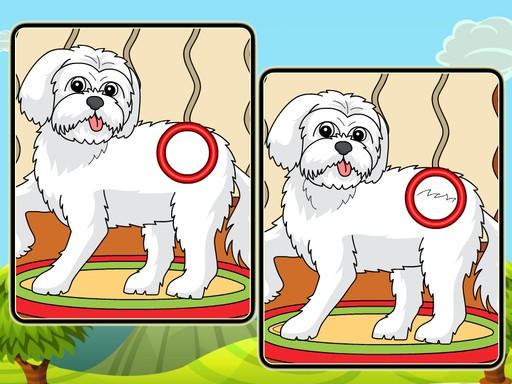
Dog Spot the Differences Puzzle
Review
Dog Spot the Differences Puzzle offers a peaceful yet engaging experience with its hand-drawn dog illustrations and gradually increasing difficulty. The simple tap controls make it accessible on any device, while the hint system helps when needed. It is perfect for family time or a quiet break, rewarding patience and attention to detail without causing frustration.
Full story
Game Introduction
Dog Spot the Differences Puzzle invites players into a world of beautifully illustrated dog scenes. Each level presents two nearly identical images of playful pups in cheerful settings like parks, living rooms, and gardens. Your task is to carefully examine both pictures and identify the small changes hidden within. The game starts with simple differences and gradually increases in complexity, keeping your mind engaged without causing frustration. With multiple levels to unlock, you can enjoy a peaceful yet stimulating activity that rewards patience and a sharp eye. This game is designed for all ages, making it a wonderful choice for family game time or a quiet break during the day.
How to Play
To play, simply select a level from the main menu. Two similar images of adorable dog scenes appear side by side. Use your mouse or finger to tap on any area where you notice a difference. Each correct tap highlights that difference and adds to your progress. Be careful not to tap on identical spots, as mistakes may reduce your score or time. If you get stuck, the hint button can guide you to the next difference. As you complete levels, new ones unlock, offering fresh puzzles and more cute dog moments. The controls are intuitive, so you can start playing right away without a tutorial.
Game Features
Features include: Stunning, hand-drawn dog scenes that are visually appealing. Escalating challenges that gradually test your observation skills. Family-friendly content suitable for players of all ages. Hints available when you need a little help. Multiple levels to explore, ensuring hours of enjoyable gameplay. Simple tap or click controls that work on both desktop and mobile devices.
Tips for Success
Take your time scanning each image systematically, such as from left to right or top to bottom. Use the hint button sparingly to build your observation skills. Practice regularly to improve your speed and accuracy. Focus on small details like color changes, missing objects, or shifted items. Stay patient and avoid rushing, as careful examination often reveals differences that are easy to miss.









Reader Comments
Sign in to comment
You must be logged in before posting a review or rating.
No account? Create one
No comments yet. Be the first to comment!